Appearance
Styles
Edit the global style object
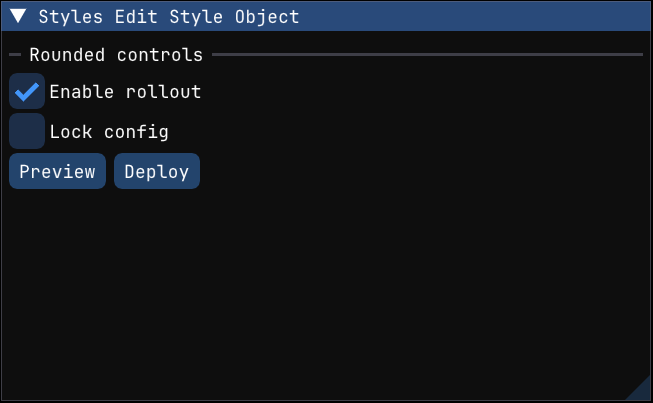
Edit imgui.get_style() directly when you want to make a small global tweak without replacing the entire Dear ImGui preset.
This example changes only frame_rounding and frame_padding, renders a few controls with the adjusted look, and then restores the original values. The important idea is that the style object is global for the current context, so direct edits should be restored if you only want them to affect one section of the UI.
python
def styles_edit_style_object(state: EditStyleState):
    style = imgui.get_style()
    saved_frame_rounding = style.frame_rounding
    saved_frame_padding = style.frame_padding

    style.frame_rounding = 8.0
    style.frame_padding = (10.0, 6.0)

    imgui.separator_text("Rounded controls")
    _clicked, state.enable_rollout = imgui.checkbox("Enable rollout", state.enable_rollout)
    _clicked, state.lock_config = imgui.checkbox("Lock config", state.lock_config)
    imgui.button("Preview")
    imgui.same_line()
    imgui.button("Deploy")

    style.frame_rounding = saved_frame_rounding
    style.frame_padding = saved_frame_padding
Scoped style push/pop
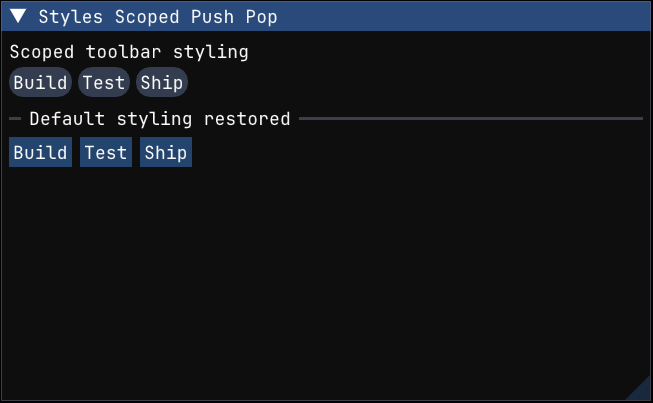
Use push_style_color() and push_style_var() when you want styling changes to affect only a small region of the interface.
The first block below changes button colors, frame rounding, and spacing for a compact toolbar. The second block is rendered immediately afterwards without those pushes, which makes it clear that the style changes were local and automatically reverted by the matching pop_style_*() calls.
python
def styles_scoped_push_pop():
    imgui.text("Scoped toolbar styling")
    imgui.push_style_var(imgui.StyleVar.FRAME_ROUNDING, 999.0)
    imgui.push_style_var(imgui.StyleVar.ITEM_SPACING, (6.0, 6.0))
    imgui.push_style_color(imgui.Col.BUTTON, (0.20, 0.24, 0.31, 1.0))
    imgui.push_style_color(imgui.Col.BUTTON_HOVERED, (0.31, 0.45, 0.64, 1.0))
    imgui.push_style_color(imgui.Col.BUTTON_ACTIVE, (0.24, 0.36, 0.53, 1.0))

    imgui.push_id("row1")
    imgui.button("Build")
    imgui.same_line()
    imgui.button("Test")
    imgui.same_line()
    imgui.button("Ship")
    imgui.pop_id()

    imgui.pop_style_color(3)
    imgui.pop_style_var(2)

    imgui.separator_text("Default styling restored")
    imgui.push_id("row2")
    imgui.button("Build")
    imgui.same_line()
    imgui.button("Test")
    imgui.same_line()
    imgui.button("Ship")
    imgui.pop_id()
Preset style with overrides
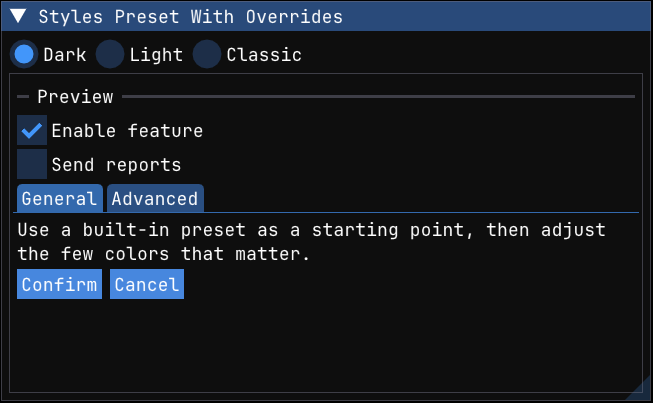
Start from one of Dear ImGui's built-in style presets and then override a few colors to establish your own accent.
This pattern is often the fastest way to get to a coherent look: pick dark, light, or classic as a base, then tweak a handful of colors that matter most for your product. The example snapshots the current color table, applies the selected preset, adds a stronger accent to headers and buttons, renders a preview panel, and restores the original colors before returning.
python
def styles_preset_with_overrides(state: PresetStyleState):
    _clicked, state.preset = imgui.radio_button("Dark", state.preset, 0)
    imgui.same_line()
    _clicked, state.preset = imgui.radio_button("Light", state.preset, 1)
    imgui.same_line()
    _clicked, state.preset = imgui.radio_button("Classic", state.preset, 2)

    saved_colors = _snapshot_colors()
    if state.preset == 0:
        imgui.style_colors_dark()
        accent = (0.28, 0.53, 0.87, 1.0)
    elif state.preset == 1:
        imgui.style_colors_light()
        accent = (0.17, 0.46, 0.80, 1.0)
    else:
        imgui.style_colors_classic()
        accent = (0.34, 0.47, 0.76, 1.0)

    style = imgui.get_style()
    style.colors[imgui.Col.BUTTON] = accent
    style.colors[imgui.Col.BUTTON_HOVERED] = (
        min(accent[0] + 0.08, 1.0),
        min(accent[1] + 0.08, 1.0),
        min(accent[2] + 0.08, 1.0),
        1.0,
    )
    style.colors[imgui.Col.HEADER] = (
        accent[0] * 0.85,
        accent[1] * 0.85,
        accent[2] * 0.85,
        1.0,
    )

    imgui.begin_child("preset preview", (0, 0), imgui.ChildFlags.BORDERS)
    imgui.separator_text("Preview")
    imgui.checkbox("Enable feature", True)
    imgui.checkbox("Send reports", False)
    if imgui.begin_tab_bar("##preset-tabs"):
        if imgui.begin_tab_item("General")[0]:
            imgui.text_wrapped("Use a built-in preset as a starting point, then adjust the few colors that matter.")
            imgui.end_tab_item()
        if imgui.begin_tab_item("Advanced")[0]:
            imgui.text("Accent colors usually need the least work to make a preset feel custom.")
            imgui.end_tab_item()
        imgui.end_tab_bar()
    imgui.button("Confirm")
    imgui.same_line()
    imgui.button("Cancel")
    imgui.end_child()

    _restore_colors(saved_colors)
Color palette popup
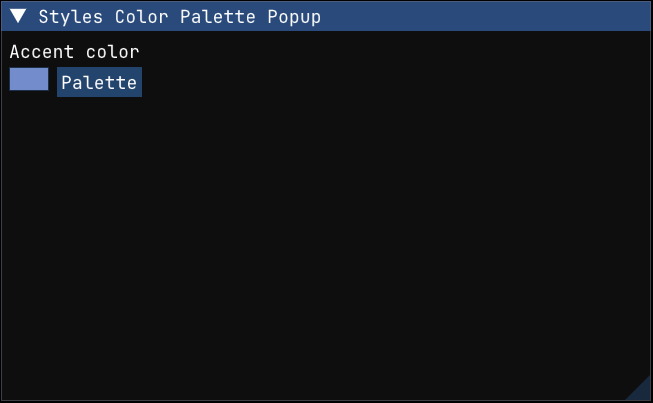
Build a custom color-selection popup around color_button() and color_picker4().
This example uses a compact swatch as the trigger, opens a popup with saved palette colors, and embeds a full color picker in the same popup. The backup_color field makes the flow reversible, which is useful for "try a few accent colors and cancel if needed" interactions.
python
def styles_color_palette_popup(state: PaletteState):
    imgui.text("Accent color")
    opened = imgui.color_button(
        "##accent",
        state.color,
        imgui.ColorEditFlags.NO_TOOLTIP,
        (40, 24),
    )
    imgui.same_line()
    opened = imgui.button("Palette") or opened

    if opened:
        state.backup_color = state.color
        imgui.open_popup("accent-palette")

    if imgui.begin_popup("accent-palette"):
        imgui.text("Saved palette")
        for i, color in enumerate(state.palette):
            if i > 0:
                imgui.same_line()
            imgui.push_id(i)
            if imgui.color_button("##palette", color, imgui.ColorEditFlags.NO_TOOLTIP, (24, 24)):
                state.color = color
            imgui.pop_id()

        imgui.separator_text("Picker")
        changed, new_color = imgui.color_picker4(
            "##picker",
            state.color,
            imgui.ColorEditFlags.NO_SIDE_PREVIEW | imgui.ColorEditFlags.NO_SMALL_PREVIEW,
        )
        if changed:
            state.color = new_color

        if imgui.button("Revert"):
            state.color = state.backup_color
        imgui.same_line()
        if imgui.button("Close"):
            imgui.close_current_popup()

        imgui.end_popup()